Showing posts with label Maven. Show all posts

Thursday, March 19, 2009

Maven Meet Up at Sonatype part II

Brian is now talking about Nexus. There are three types of repositories in Nexus:
  • Hosted - the repo lives on disk
  • Proxy - this is a proxy to another repository
  • Virtual - this allows you to convert between repository formats, say M1 is hosted, you can create a Virtual proxy that converts M1 to M2

You can schedule tasks like cleaning up snapshots. There are RSS feeds for most of the things Nexus does so you know the state of your repo. It will download remote repo indexes. There is no database required for Nexus. Nexus provides a full set of REST APIs to all its features.

The only time you use a repository URL directly in Nexus is when you want to deploy an artifact. With staging & promotion you don't even need to use a repo URL to deploy your artifacts. Why have a stating & promotion strategy? What if you want to test something before actually release it? Enter Nexus stating & promotion. All release deployments occur against a single REST URL in Nexus. The URL can be set once in the corp-pom for all projects, regardless of repository. With templates you can define how Nexus creates this new stating repo. Currently, you can only stage your binary artifacts but not your site artifacts. If you stage something many times and decide only to keep the last build, you'll need to manually remove all but the last site's you generated (this assumes that you don't overwrite your existing site with each release). Since all of Nexus is controlled by REST URLs, you can build your own work flow to control when a repo is promoted or not.

Next up is procurement, how to control what artifacts are available to your projects. Procurement is effectively a firewall that separates the users from another repository (or repo group) in the system. By default, everything is denied.

Sonatype is planning on multiple versions of Nexus: Nexus (open source version, free), Nexus Pro, Nexus Enterprise (HA, Federation, etc.) and Nexus Compliance (legal, etc.).

Maven Meet Up at Sonatype part I

Maven 3.0 will be fixing what we've learned in Maven 1.0 and 2.0. Layered repository, at the command line there is really only one repo, but in an env like Eclipse there are many repositories, other projects, so Maven 3.0 will have the concept of layered repositories. Jason said they have a lot of integration tests to ensure the backwards compatibility of Maven 3.0 with Maven 2.0. Personally, I hope it goes better than the Maven 2.0.8 to Maven 2.0.9 transition.

Plugin extension points, something borrowed from Eclipse, plugins will have extension points. This way you can extend a plugin without having to hack it. Plugins will also be able to tell Maven, here are my output directories, this way in Eclipse Maven will not need to run all the plugins to get their generated source dirs. This would be a big improvement.

Mercury is the new repository and transport layer for Maven. Why Mercury? Maven 2 has inaccurate conflict resolution, based on custom graph walking algorithm, hard to replace, API is too complex. The resolution mechanism is too coupled to Plexus, cannot use it from other environments. Mercury is a general purpose library for artifact and repository management. ArtifactMetadata - artifact comprehension info, not only do you need GAV (GroupId, ArtifactId, Version) but you also need classifier, type, etc. Mercury repos can be local or remote, readable or read/write, this helps optimize Mercury. It also supports global exclusions.

Mercury has it's own metadata cache to cache metadata for remove repositories. The new transport layer is a Jetty client, supports connection multiplexing (NIO), concurrent connections, SSL support. Webtide added stream verification , proxy support and authentication.

Oleg is now talking about Sonatype Proviso, a tool for updating binaries (e.g. Maven). Mercury Runner is a side project for Oleg, it gives you a way to run an application without defining a classpath. Attribute based resolution, we don't just care about a JAR, or it's version, we actually want to know about it's quality, etc. Like this:

<project>
...
<version>1.2</version>
...
<attributes>
  <servletApi>3.0</servletApi>
  <coverage:pmd>80</coverage:pmd>
  <quality>alpha</quality>
</attributes>
...
<project>
<dependency>
 <servletApi>[2.5,)</servletApi>
 <coverage:pmd>[80,)</coverage:pmd>
</dependency>

Thursday, February 14, 2008

Overstock.com and Seam

As I mentioned a while back, I now work at Overstock.com. One of the things I've been working on for a couple of months is bringing JBoss Seam to Overstock. First off, just to clarify where we are using Seam: We will not be using Seam for the public Overstock.com website, the one you might be familiar with here however; we will be using it for internal application development. This is a really exciting time for me at Overstock because I'm helping to usher in some new technologies like Seam and my other favorite open source project, Maven. Since something like Seam is new to Overstock, I've had to put together some training courses, get "the seam Book" and put together a Maven Archetype to jump start projects. Over the next couple of days, I'll be posting a working pom file (along with a download) you can use for your own Seam/Maven project. My efforts are based on Michael Yuan's posts about Seam and Maven, with tweaks so you don't have to inherit from the Seam pom. One last thing on the Seam front, in case you missed it, there is a new Seam community site now available. The best part of all is that it is built on Seam. If you cannot eat your own dog food than your framework sucks :-)

Tuesday, November 6, 2007

Rocky Mountain Software Symposium

I just finished uploading my slides for this weekends Rocky Mountain Software Symposium (aka NFJS Denver). I have two sessions, one on JPA and another on Maven 2. Here are my presentations. I hope to see you there.

Thursday, October 11, 2007

Getting Maven and Eclipse to work together to filter resources

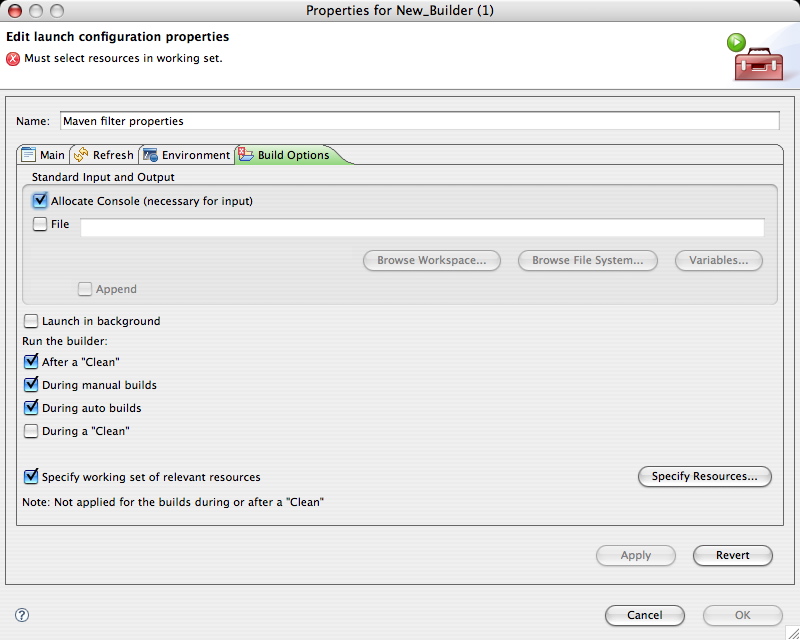
I don't really care for any of the Eclipse plugins currently available for Maven (m2eclipse or Q4E), however I do like the Maven plugin for eclipse (it seems to be the only one that works). At Overstock.com everyone uses Eclipse, so as we are moving to Maven it is important that Maven work well in the IDE. Most folks checkout their code, develop and then check there code back into svn via Eclipse, never hitting the command line. Obviously, the Maven Eclipse plugin won't be good for them, so currently we are using m2eclipse for Eclipse/Maven integration. One of the problems I've been running into is filtering resources, I believe if you are using m2eclipse and you choose (from the popup menu) Maven -> Update Source Folders all your resources will be filtered (if you have filtering turned on in your pom.xm). I don't want to do that and folks will forget to do it, furthermore, since I do use the Maven Eclipse plugin (requiring the command line) and I don't use m2eclipse, this won't work for me. So how do you get Maven and Eclipse to work together? This feature request for m2eclipse provides some pointers. Eugene suggests using a Maven build(er), but I cannot do that (because I'm not using m2ecilpse and I couldn't get it to work correctly when I tried), so I'll use a Program builder instead. In the Package Explorer, right click on your project and select properties, this brings up the Properties for xxx dialog box. In the list on the left, choose Builders, as shown in the image below (click on any of the images below for a larger version): Next, click the New... button and choose the Program builder: In the Properties for New_Builder (1) dialog box, use the Browse File System... button to locate your copy of the mvn executable. For the Working Directory section, click the Browse Workspace... button and select your project. For the Arguments section add the following:
resources:resources resources:testResources
Here is how the dialog should look like so far: To finish things off, select the Build Options tab at the top of the Properties for New_Build (1) dialog box and make sure the During auto builds check box is selected (actually you want all check boxes under Run the builder to be checked except for During a "Clean"). Next select the Specify working set of relevant resources check box and then click Specify Resources.... In the dialog box that pops up, navigate to your src/main/resources and src/test/resources folders and click the check box to the left so these folders are included in your working set, click Finish. Here is what the Build Options tab should look like: That's it, now when you refresh your workspace, try to run a unit test, etc. all your resources are filtered just as if you were doing it from the command line. If you have a way to do this correctly with m2eclipse or Q4E please let me know. Update: you may want to add the -o command line switch for Maven so that it doesn't try to look for JARs to download. You will want to add -o to the resources:resources... code above. Update 2: If you are using the m2eclipse plugin, check out Eugene Kuleshov's response to this post. Also, if you decide to keep using an external builder, you'll want to make sure the "Refresh resources upon completion." check box is selected on the Refresh tab of the builder dialog box. Update 3/12/08: In the "Build Options" section above you'll need to select all options under "Run the builder", so that it runs both during and after a clean. Also, I no longer use the m2eclipse builder, I only use a Program Builder.