Tuesday, November 6, 2007
Rocky Mountain Software Symposium
I just finished uploading my slides for this weekends Rocky Mountain Software Symposium (aka NFJS Denver). I have two sessions, one on JPA and another on Maven 2.
Here are my presentations. I hope to see you there.

Monday, November 5, 2007
Eclipse Tip
Are you tired of seeing all Java files in your Eclipse project showing this icon:  Would you like to know if a Java file is an enum, an Interface, or maybe an annotation? Just turn on the Java Type Indicator preference and your class icons will change from this:
 to this:
 .
For detailed instructions on how to turn this preference on, check out this Eclipse help page.
.
For detailed instructions on how to turn this preference on, check out this Eclipse help page.
Would you like to know if a Java file is an enum, an Interface, or maybe an annotation? Just turn on the Java Type Indicator preference and your class icons will change from this:
to this:
.
For detailed instructions on how to turn this preference on, check out this Eclipse help page.
Sunday, October 28, 2007
Upgrade to Leopard, the story so far
I was really looking forward to upgrading to Leopard today but I'm not sure if I'm happier now that it's all done. Apple is starting to do some really stupid things lately. I've been a Apple/Next user/developer since 1992, eight years on Next and the last seven years on Apple. I have to ask, what the hell are they thinking? No Java 6 support, key bindings removed for Front Row, you cannot use an AirDisk with Time Machine, AirDisks don't work and so on.
I guess I'll have to see how things go over the next week or two, but I'm not going to install Leopard on any other mac in my house till things get better. On a similar note, I bought a Apple TV a few months back and returned it after two days. I've never been unhappy with an Apple product before, but this seems to be becoming a trend :-) I love my iPhone, but Apple's tendency to control every aspect of my computer is really starting to piss me off. BTW, wtf is up with Front Row, when I browse out of the "Music" section the music stops, Front Row 1.x didn't do this, it played music till you picked something else for it to play.
I'm going to watch a movie, I'm sure that will be more enjoyable than the last hour has been.
Thursday, October 11, 2007
Getting Maven and Eclipse to work together to filter resources
I don't really care for any of the Eclipse plugins currently available for Maven (m2eclipse or Q4E), however I do like the Maven plugin for eclipse (it seems to be the only one that works). At Overstock.com everyone uses Eclipse, so as we are moving to Maven it is important that Maven work well in the IDE. Most folks checkout their code, develop and then check there code back into svn via Eclipse, never hitting the command line. Obviously, the Maven Eclipse plugin won't be good for them, so currently we are using m2eclipse for Eclipse/Maven integration. One of the problems I've been running into is filtering resources, I believe if you are using m2eclipse and you choose (from the popup menu) Maven -> Update Source Folders all your resources will be filtered (if you have filtering turned on in your pom.xm). I don't want to do that and folks will forget to do it, furthermore, since I do use the Maven Eclipse plugin (requiring the command line) and I don't use m2eclipse, this won't work for me. So how do you get Maven and Eclipse to work together?
This feature request for m2eclipse provides some pointers. Eugene suggests using a Maven build(er), but I cannot do that (because I'm not using m2ecilpse and I couldn't get it to work correctly when I tried), so I'll use a Program builder instead. In the Package Explorer, right click on your project and select properties, this brings up the Properties for xxx dialog box. In the list on the left, choose Builders, as shown in the image below (click on any of the images below for a larger version):
 Next, click the New... button and choose the Program builder:
 In the Properties for New_Builder (1) dialog box, use the Browse File System... button to locate your copy of the mvn executable. For the Working Directory section, click the Browse Workspace... button and select your project. For the Arguments section add the following:
  To finish things off, select the Build Options tab at the top of the Properties for New_Build (1) dialog box and make sure the During auto builds check box is selected (actually you want all check boxes under Run the builder to be checked except for During a "Clean"). Next select the Specify working set of relevant resources check box and then click Specify Resources.... In the dialog box that pops up, navigate to your src/main/resources and src/test/resources folders and click the check box to the left so these folders are included in your working set, click Finish. Here is what the Build Options tab should look like:
 That's it, now when you refresh your workspace, try to run a unit test, etc. all your resources are filtered just as if you were doing it from the command line.
If you have a way to do this correctly with m2eclipse or Q4E please let me know.
Update: you may want to add the -o command line switch for Maven so that it doesn't try to look for JARs to download. You will want to add -o to the resources:resources... code above.
Update 2: If you are using the m2eclipse plugin, check out Eugene Kuleshov's response to this post. Also, if you decide to keep using an external builder, you'll want to make sure the "Refresh resources upon completion." check box is selected on the Refresh tab of the builder dialog box.
Update 3/12/08: In the "Build Options" section above you'll need to select all options under "Run the builder", so that it runs both during and after a clean. Also, I no longer use the m2eclipse builder, I only use a Program Builder.
That's it, now when you refresh your workspace, try to run a unit test, etc. all your resources are filtered just as if you were doing it from the command line.
If you have a way to do this correctly with m2eclipse or Q4E please let me know.
Update: you may want to add the -o command line switch for Maven so that it doesn't try to look for JARs to download. You will want to add -o to the resources:resources... code above.
Update 2: If you are using the m2eclipse plugin, check out Eugene Kuleshov's response to this post. Also, if you decide to keep using an external builder, you'll want to make sure the "Refresh resources upon completion." check box is selected on the Refresh tab of the builder dialog box.
Update 3/12/08: In the "Build Options" section above you'll need to select all options under "Run the builder", so that it runs both during and after a clean. Also, I no longer use the m2eclipse builder, I only use a Program Builder.
 Next, click the New... button and choose the Program builder:
 In the Properties for New_Builder (1) dialog box, use the Browse File System... button to locate your copy of the mvn executable. For the Working Directory section, click the Browse Workspace... button and select your project. For the Arguments section add the following:
 resources:resources resources:testResourcesHere is how the dialog should look like so far:
 To finish things off, select the Build Options tab at the top of the Properties for New_Build (1) dialog box and make sure the During auto builds check box is selected (actually you want all check boxes under Run the builder to be checked except for During a "Clean"). Next select the Specify working set of relevant resources check box and then click Specify Resources.... In the dialog box that pops up, navigate to your src/main/resources and src/test/resources folders and click the check box to the left so these folders are included in your working set, click Finish. Here is what the Build Options tab should look like:
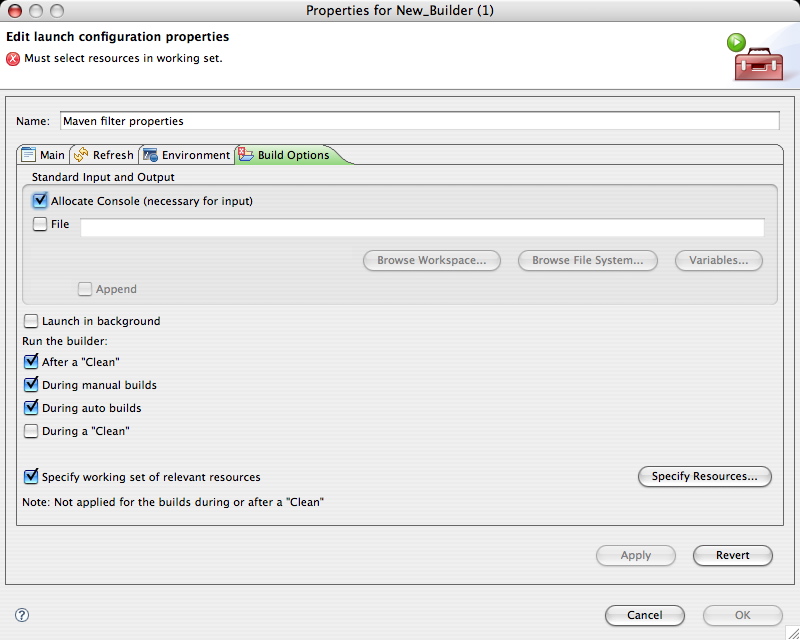 That's it, now when you refresh your workspace, try to run a unit test, etc. all your resources are filtered just as if you were doing it from the command line.
If you have a way to do this correctly with m2eclipse or Q4E please let me know.
Update: you may want to add the -o command line switch for Maven so that it doesn't try to look for JARs to download. You will want to add -o to the resources:resources... code above.
Update 2: If you are using the m2eclipse plugin, check out Eugene Kuleshov's response to this post. Also, if you decide to keep using an external builder, you'll want to make sure the "Refresh resources upon completion." check box is selected on the Refresh tab of the builder dialog box.
Update 3/12/08: In the "Build Options" section above you'll need to select all options under "Run the builder", so that it runs both during and after a clean. Also, I no longer use the m2eclipse builder, I only use a Program Builder.
That's it, now when you refresh your workspace, try to run a unit test, etc. all your resources are filtered just as if you were doing it from the command line.
If you have a way to do this correctly with m2eclipse or Q4E please let me know.
Update: you may want to add the -o command line switch for Maven so that it doesn't try to look for JARs to download. You will want to add -o to the resources:resources... code above.
Update 2: If you are using the m2eclipse plugin, check out Eugene Kuleshov's response to this post. Also, if you decide to keep using an external builder, you'll want to make sure the "Refresh resources upon completion." check box is selected on the Refresh tab of the builder dialog box.
Update 3/12/08: In the "Build Options" section above you'll need to select all options under "Run the builder", so that it runs both during and after a clean. Also, I no longer use the m2eclipse builder, I only use a Program Builder.
Wednesday, October 10, 2007
Welcome to the Twilight Zone
Since I'm caught up on the latest Java Posse episode, I thought I'd listen to the radio on my way into work today. It turns out my local NPR station just started it's fall membership drive. After about five minutes of listening, one of the local sponsor's (a car dealership) joked about programming everyone's car radios to always tune to an NPR station. Laughing, I decided to switch stations, well guess what? Every station I turned to was NPR. No kidding, it was so bizarre that I had to call my wife to tell her. When I turned the radio back on, it was on another station. Then when I went back to NPR, all stations played NPR.
I'm not sure what was going on but it seems that my radio only wants NPR ;-)
Friday, September 28, 2007
Annotated JAXB Classes
Over the last week or so, I've started to use JAXB along with the Restlet framework. We are actively developing RESTful web services here at Overstock.com. So being new to the Restlet framework, I was eager to get started. One type of representation supported by Restlet is of course XML. To generate XML representations we are using JAXB 2. Being an advocate of annotations, I thought I'd start with annotated POJO's and let the JAXB provider do the rest (I assumed this would be a lot like JPA). I ran into a problem however, trying to create a JAXBContext for my package, I got this error:
WARNING: Problem creating Marshaller
javax.xml.bind.JAXBException: "com.overstock" doesnt contain ObjectFactory.class or jaxb.index1 package com.overstock; 2 3 import javax.xml.bind.annotation.XmlAccessType; 4 import javax.xml.bind.annotation.XmlAccessorType; 5 import javax.xml.bind.annotation.XmlElement; 6 import javax.xml.bind.annotation.XmlRootElement; 7 8 @XmlRootElement(name="example", namespace="http://overstock.com/example") 9 @XmlAccessorType(XmlAccessType.FIELD) 10 public class ExampleJaxbClass { 11 12 @XmlElement(required=true) 13 private String elementOne; 14 private String elementTwo; 15 16 protected ExampleJaxbClass() { 17 super(); 18 } 19 20 public String getElementOne() { 21 return elementOne; 22 } 23 public void setElementOne(String elementOne) { 24 this.elementOne = elementOne; 25 } 26 public String getElementTwo() { 27 return elementTwo; 28 } 29 public void setElementTwo(String elementTwo) { 30 this.elementTwo = elementTwo; 31 } 32 }You can easily convert it to XML via the
javax.xml.bind.Marshaller class, like this:1 public class ExampleTest { 2 3 @Test 4 public void generateXml() throws JAXBException { 5 ExampleJaxbClass ex = new ExampleJaxbClass(); 6 ex.setElementOne("first Element Value"); 7 ex.setElementTwo("second Element Value"); 8 9 // Get a JAXB Context for the object we created above 10 JAXBContext context = JAXBContext.newInstance(ex.getClass()); 11 12 // To convert ex to XML, I need a JAXB Marshaller 13 Marshaller marshaller = context.createMarshaller(); 14 15 // Make the output pretty 16 marshaller.setProperty(Marshaller.JAXB_FORMATTED_OUTPUT, true); 17 StringWriter sw = new StringWriter(); 18 19 // marshall the object to XML 20 marshaller.marshal(ex, sw); 21 22 // print it out for this example 23 System.out.println(sw.toString()); 24 } 25 }
Here is the XML generated by the annotations above:
<?xml version="1.0" encoding="UTF-8" standalone="yes"?>
<ns2:example xmlns:ns2="http://overstock.com/example">
<elementOne>first Element Value</elementOne>
<elementTwo>second Element Value</elementTwo>
</ns2:example>
Now for the problem. To create a marshaller, you first need to create a
JAXBContext via its newInstance() factory method. You can create a context for a specific JAXB class, as in the example above, or you can create a context for a list of packages (check out the javadoc page for more). When using the Restlet class JaxbRepresentation (only available in Restlet 1.1m1), it uses the package version of newInstance(), that's when I got my error above. I didn't want to create an ObjectFactory (apparently this is another way to get around the above error), at least not yet if I could help it, so I wanted to get some more info on the jaxb.index file. I couldn't find out much, I even looked at the JSR-222 spec. Well, it turns out that all you need to do is add class names to the file and place the file in the package (directory) where your JAXB annotated classes reside (it's similar in one way to a jpa persistence.xml file but without the xml). Here is the content of my jaxb.index file for the example class above:ExampleJaxbClass.class name.
If you want to test this out, we need to slightly change the test above. Modify line 10 in the unit test above to look like this:
JAXBContext context = JAXBContext.newInstance(ex.getClass().getPackage().getName());If the package
com.overstock does not have jaxb.index file, this change will cause the test to throw the JAXBException. Add the file and everything works great.
If you know where there is good documentation on this let me know I couldn't find any :-)
Code formatting courtesy of Code2HTML.
Friday, September 14, 2007
Goodbye consulting, hello Overstock.com
It would have been much better if I'd posted this month's ago but I've been so busy with work and the UJUG (Utah Java User Group) that I haven't had much time to blog. I'm hopping this will change from today onward.
So my first bit of news is that after being a consultant for most of the last eight years or so I've finally decided to take a full-time job with Overstock.com. I actually started back in April of this year, so I've been there for a while now. I must say that I'm having more fun at Overstock.com than I've had in years. That is part of the reason I haven't been blogging, my day job is so satisfying that when I get home I don't need to challenge myself with something interesting, I get to do interesting stuff all day long.
I'm hoping to start blogging a little more often (like more than every two months) and talk a little bit about what we are doing, from a technology standpoint that is.
On another note, I just finished an article on JPA for TheServerSide.com. I think it will be posted on Tuesday of next week (Sept. 18th). If you are interested in looking at the source, you can check out the project page here.
Friday, July 20, 2007
Salsa and the iPhone
On Tuesday my wife and I (along with our three boys) went out for dinner. At some point my wife asked what time it was, so I reached down, grabbed my mobile phone (SLVR) and much to my surprise, it slipped out of my hands and right into the salsa in front of me. Once I cleaned it off, I told my wife it was 6 PM or something. Then I realized that the USB port was full of salsa. I cleaned it out the best I could and hoped that I hadn't toasted another phone (the last time I had a "cool" phone was about three years ago and that one was washed with the rest of my clothes about a week after I got it). When we got home, I plugged it in and let it charge all night. The next day, around 9 AM or so, I started to get the low-batter warning. Around 10 AM, it shut off. Another phone, gone.
Joking around I said, now it's time for an iPhone. After talking with my wife for a while I realized that it would be really cool to get an iPhone. After all, I was now phoneless (never mind the beaten up, featureless one I had at home). A quick run down to our local Apple store, and I had an 8GB iPhone.

Friday, July 13, 2007
I was on the Java Posse?
 I was really surprised last week wen I was listening to the Java Posse and who are they interviewing at the java.net booth? Java User Group folks, and low and behold there I am. Check out episode #129 at the 39:29 mark to hear about the Utah Java User Group.
BTW, if you don't already listen to the Posse, I'd highly recommend it, it's a great source for the latest news and interviews with the who's who of the Java community.
I was really surprised last week wen I was listening to the Java Posse and who are they interviewing at the java.net booth? Java User Group folks, and low and behold there I am. Check out episode #129 at the 39:29 mark to hear about the Utah Java User Group.
BTW, if you don't already listen to the Posse, I'd highly recommend it, it's a great source for the latest news and interviews with the who's who of the Java community.
Tuesday, June 12, 2007
Safari 3.0 Public Beta
After hearing about the various Mac OS X Leopard announcements, I was happy to see a public beat for Safari. I downloaded it yesterday and started to play around with it. I was really surprised, it is a lot faster than Safari 2.x. Not only is it faster, but I cannot live without the new inline find feature - it is so cool. Yes Firefox has had this for years, but not as usable as Safari's implementation. As a longtime emacs user, I've always liked inline searching way more than the popup finder window most applications have.
If you haven't tried out the new Safari yet, I'd suggest you give it a try. If you are a windows user, have you tried it yet? The closest I get to windows is Parallels on my mac and I try to avoid that if possible too.
Oh yeah, Apple also fixed the annoying quit "feature" where Safari would just quit, no matter how many windows you had open, if you hit apple-q (or Safari->Quit Safair). Again, another Firefox feature but a welcome addition nonetheless.
Go windows? Let me know how Safari performs.
Update: I just installed Safari in Windows via Parallels, and to my surprise not only did Safari get installed but so did Software Update. Wow, Software Update is an integral part of Mac OS X. Does this mean that Apple is starting to take over the Windows desktop? What do you think?
Subscribe to:
Posts (Atom)